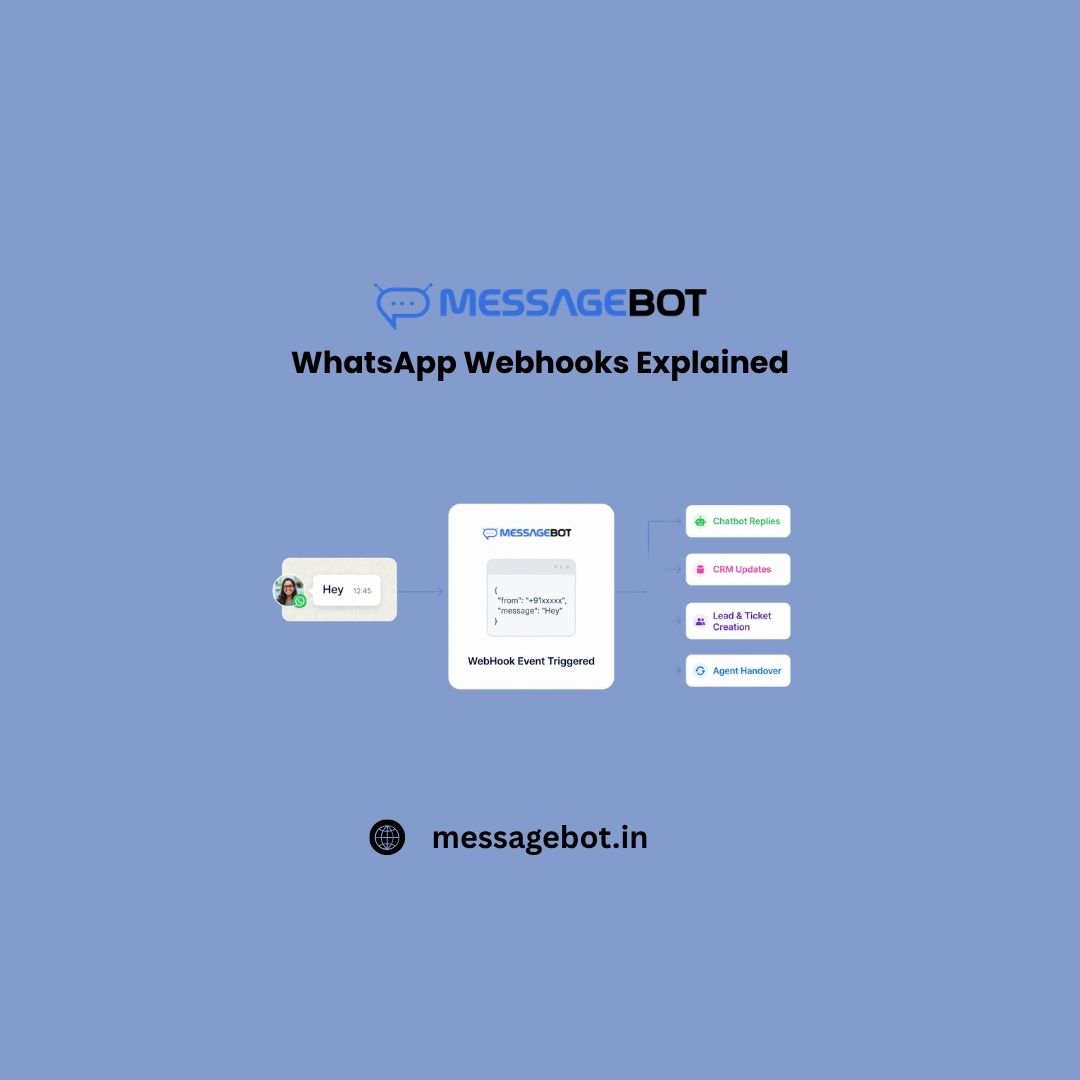
A customer just messaged your business on WhatsApp. Does your system know about it yet? Not in 30 seconds. Not in 5 seconds. Right now – the moment it happened. If the answer is no, this guide is for you. And even if you think the answer is yes, keep reading because most teams don’t realise how much is silently failing until they look closely enough.
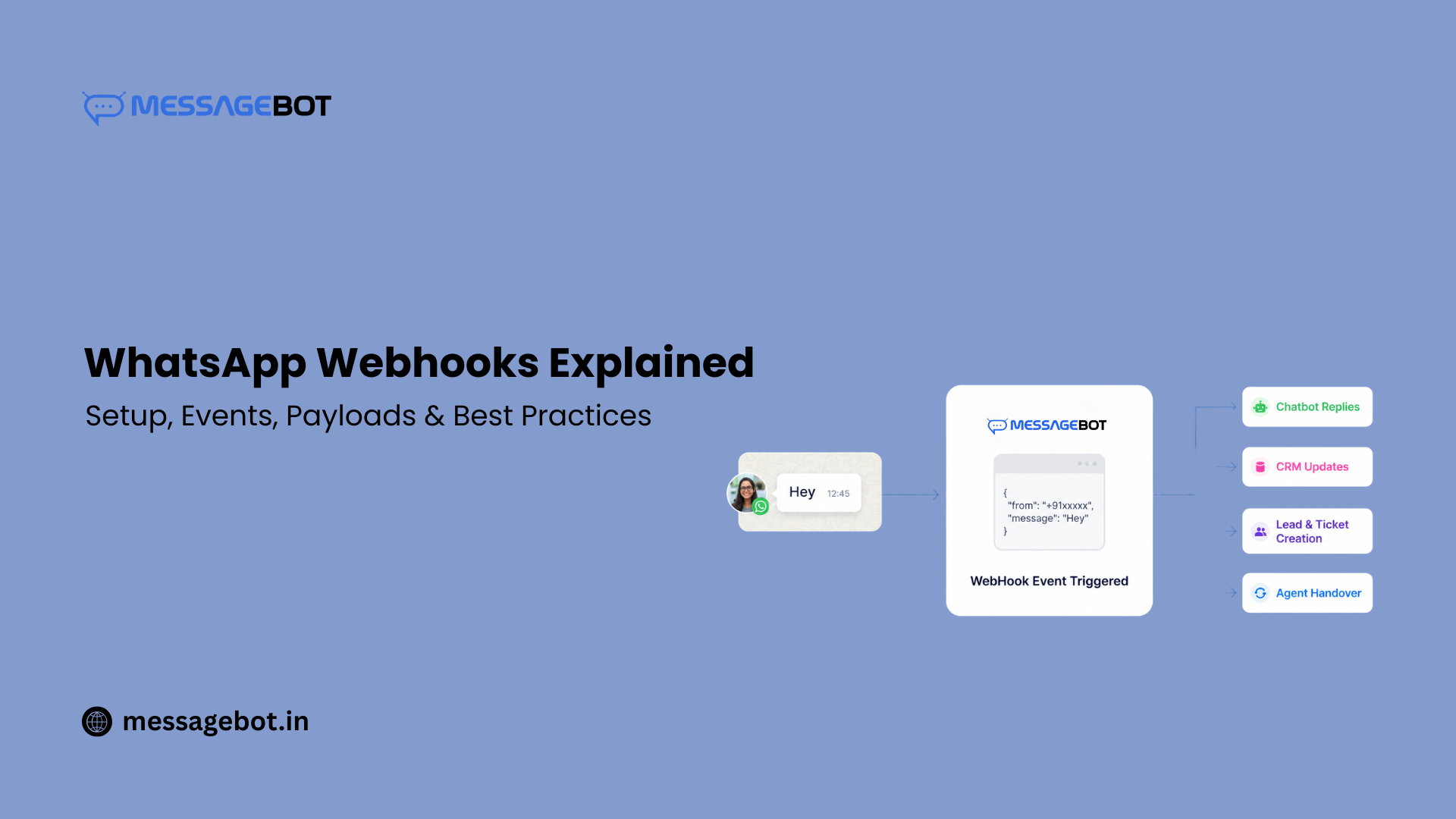 WhatsApp webhooks are the real-time event layer underneath every reliable WhatsApp integration. Chatbots, OTP confirmations, order tracking, support escalations, and CRM updates none of it works the way users expect without webhooks done right. This guide covers everything: what webhooks are, how to set them up, what every payload means, and how to build around them properly. Written for developers and product teams both.
What WhatsApp Webhooks Actually Are
Think of your business as a busy store. Every time a customer walks in, a staff member comes to you directly. “Rahul’s here, he wants to track his order.” You didn’t go outside to check. The information came to you, that’s webhooks in digital form.
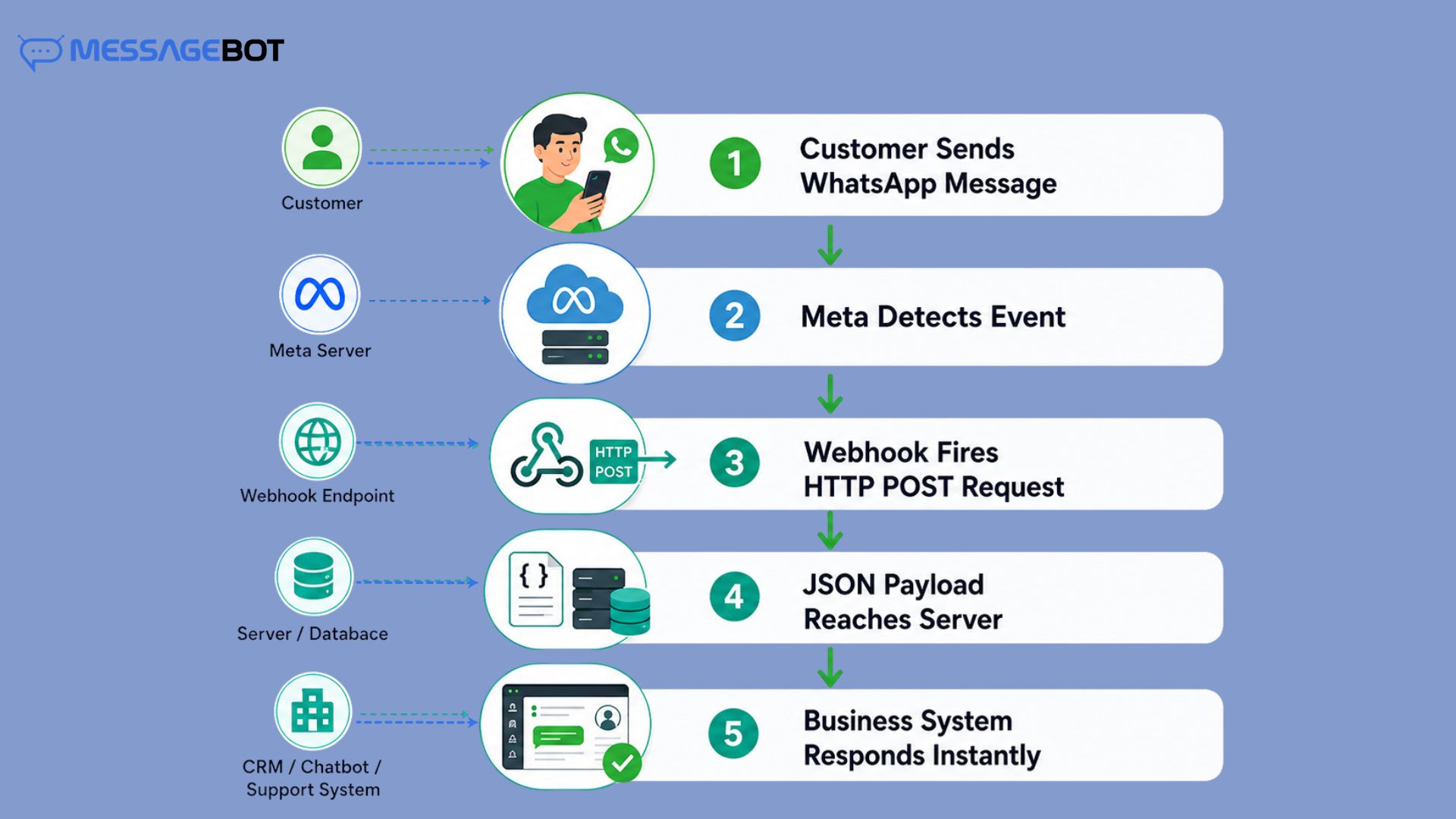 When something happens on WhatsApp a customer sends a message, your OTP gets delivered, someone reads your notification, a template gets paused. Meta’s servers immediately fire an HTTP POST request to a URL you’ve registered. Full event details, JSON payload, delivered to your door. Your server receives it, processes it, responds 200 OK. That’s the whole flow.
What this unlocks for your business:
- The moment a customer messages you, your chatbot or support system activates no polling delay
- OTP delivery confirmation arrives in real time, feeding directly into your retry logic
- You find out a template got paused before a campaign fails, not during it
- Order updates reach customers the second something changes in your system
- Read receipts tell you which messages were actually opened, not just sent
Without webhooks, all of this is either delayed or invisible.
Webhooks vs Polling: The Business Impact
Polling is when your server keeps asking Meta “any new messages? any updates? anything?” over and over, whether something happened or not. Webhooks flip that. Meta tells you when something happens. Your server does nothing until it does.
| Polling | Webhooks | |
| Response time | Seconds to minutes | Milliseconds to low seconds |
| Server load | High – constant outbound requests | Low – fires only on events |
| OTP confirmation | Delayed | Instant |
| Missed events | Common if interval is too long | Rare – Meta retries for 7 days |
| Campaign monitoring | You check manually | Automatic event alerts |
| At scale | Gets worse as volume grows | Handles spikes naturally |
Here’s what polling costs in the real world: A fintech user is going through KYC, waiting for an OTP. Polling system, 15 to 30 seconds to confirm whether the OTP even delivered. Webhook system, that confirmation is there in 1 to 2 seconds. In the first case, users think the system has crashed. A lot of them abandon the flow entirely.
In India, where OTP flows power banking, fintech onboarding, and e-commerce checkout that delay is a conversion problem, not just a technical one. It’s one of the reasons businesses running WhatsApp OTP alongside SMS fallback need both channels working in real time. More on that in the WhatsApp OTP Service guide for India.
How the Webhook Lifecycle Works
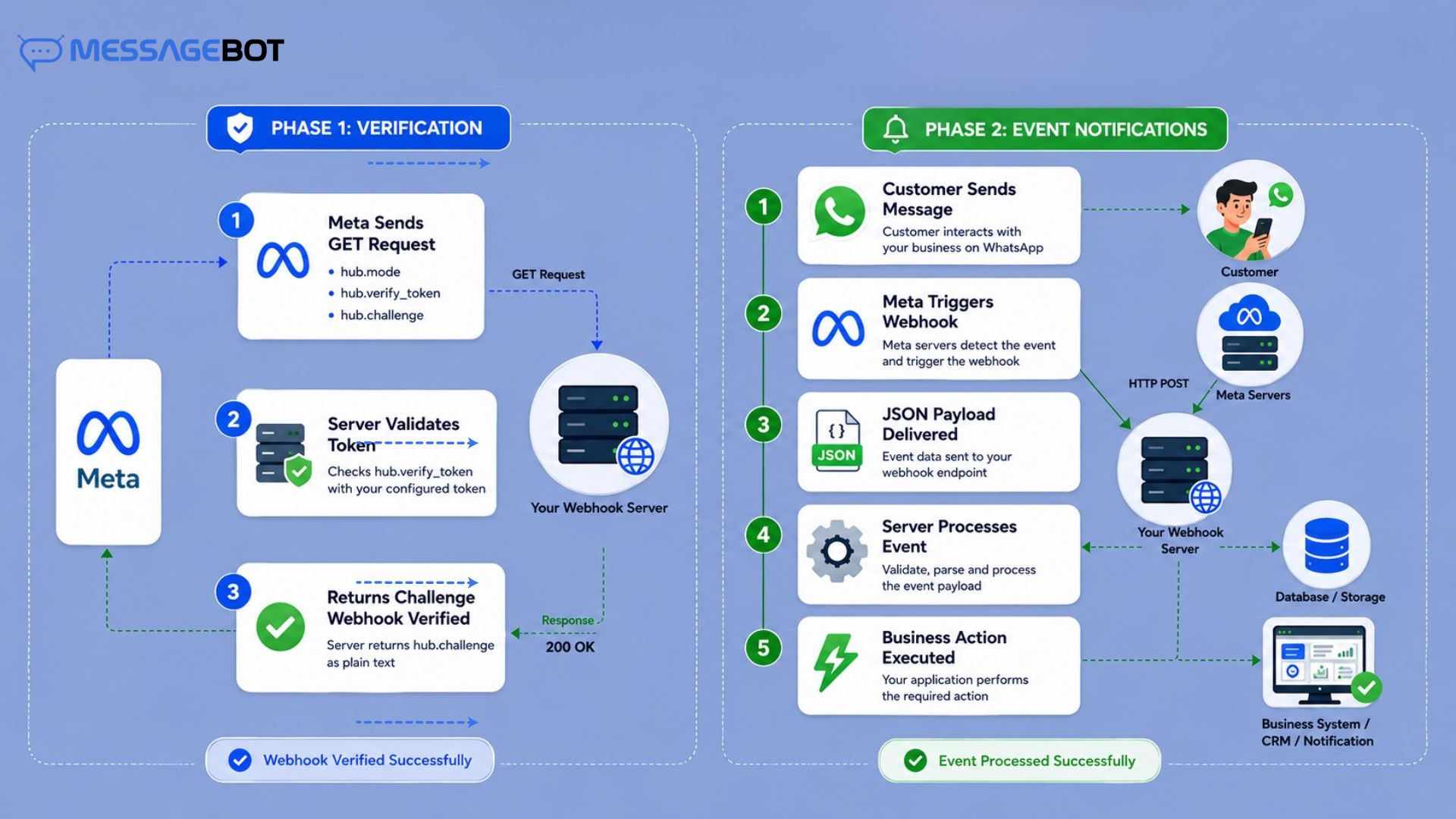
Before WhatsApp sends a single event to your server, it needs to trust your endpoint. That’s Phase 1. After that, events start flowing. That’s Phase 2.
 Phase 1: Verification (One Time)
When you register a webhook URL in the Meta App Dashboard, Meta sends a GET request to your endpoint with three parameters:
- hub.mode – always subscribe
- hub.verify_token – the string you set in the dashboard
- hub.challenge – a random string Meta generates
Your job: confirm the mode and token match, then return the challenge value with HTTP 200. That’s it. Meta sees the correct response and marks your endpoint as verified.
javascript
app.get(‘/webhook’, (req, res) => {
const mode = req.query[‘hub.mode’];
const token = req.query[‘hub.verify_token’];
const challenge = req.query[‘hub.challenge’];
if (mode === ‘subscribe’ && token === process.env.VERIFY_TOKEN) {
res.status(200).send(challenge);
} else{
res.sendStatus(403);
}
});
Most common reason this fails: the URL isn’t publicly accessible. localhost doesn’t work. Use ngrok during development; it gives you a temporary public HTTPS URL that tunnels to your local machine.
Phase 2: Event Notifications (Ongoing)
Once verified, every subscribed event triggers a POST request to your endpoint. Every single payload regardless of event type – follows this wrapper structure:
json
{
“object”: “whatsapp_business_account”,
“entry”: [{
“id”: “WABA_ID”,
“changes”: [{
“value”: { … },
“field”: “messages”
}]
}]
}
field tells you what category of event this is. value holds everything specific to that event the message content, the delivery status, the template change, whatever happened.
Which Events You Can Subscribe To
You don’t get everything by default. In the Meta App Dashboard, you choose which event fields to subscribe to. Here’s what’s available and who actually needs it:
| Field | What You Receive | Who Needs It |
| messages | Inbound user messages + status updates on your outbound messages | Everyone — this is the core field |
| message_template_status_update | Template approved, rejected, paused, disabled, reinstated | Every business using templates |
| account_update | Policy violations, account restrictions | Enterprise teams |
| phone_number_quality_update | Quality rating changes for your registered number | High-volume senders |
| phone_number_name_update | Display name approval or rejection | During onboarding |
| business_capability_update | Messaging capability changes to your account | Platform builders |
| security | Unusual login activity, token events | Security-conscious integrations |
| flows | WhatsApp Flows status updates | Businesses using Flows |
The two you should subscribe to from day one:
messages – handles both inbound customer messages and outbound delivery tracking in one field. Without this, you’re flying blind.
message_template_status_update – this is the one most teams skip, and it’s the one that causes the most painful surprises. More on that in the payloads section below.
Real Payloads: What Arrives and What It Means
1. Customer Sent a Text Message
json
{
“messages”: [{
“from”: “919876543210”,
“id”: “wamid.XXXXX”,
“timestamp”: “1717500000”,
“type”: “text”,
“text”: { “body”: “Where is my order?” }
}],
“contacts”: [{
“profile”: { “name”: “Priya Mehta” },
“wa_id”: “919876543210”
}]
}
A customer just reached out. from identifies them in your system, text.body tells you what they want, id is what you reference when you reply. This is the trigger point for everything – chatbot response, support ticket creation, CRM lookup, agent assignment.
2. Your Message Was Delivered or Read
json
{
“statuses”: [{
“id”: “wamid.XXXXX”,
“status”: “delivered”,
“timestamp”: “1717500060”,
“recipient_id”: “919876543210”,
“conversation”: {
“origin”: { “type”: “utility”
},
“pricing”: {
“billable”: true,
“category”: “utility”
}
}]
}
Status values move in sequence: sent → delivered → read. Each means something different:
- sent – Meta accepted it and is attempting delivery
- delivered – it reached the user’s device
- read – the user actually opened it
pricing.category – utility, authentication, marketing, or service – maps directly to your conversation billing. Log this for cost tracking. It also tells you whether a conversation opened as a utility (transactional) or marketing session, which matters when you’re analysing campaign ROI. The full pricing breakdown for Indian businesses is covered in the WhatsApp Business API Pricing guide.
3. Message Failed to Deliver
json
{
“statuses”: [{
“id”: “wamid.XXXXX”,
“status”: “failed”,
“recipient_id”: “919876543210”,
“errors”: [{
“code”: 131026,
“error_data”: {
“details”: “This user’s phone number is not registered on WhatsApp.”
}
}]
}]
}
This is the payload most teams don’t process and it’s the most consequential one. Your API call returned 200. Meta accepted the request. But the message never actually reached the user. The failure arrives here, asynchronously, via webhook.
If you’re not handling failed status events, you have no visibility into how many of your messages are silently not reaching people. Error code 131026 means the number isn’t on WhatsApp, trigger your SMS fallback immediately. Error code 131050 means the user opted out — remove them from future campaigns and don’t retry.
4. Template Got Paused
json
{
“changes”: [{
“value”: {
“event”: “PAUSED”,
“message_template_name”: “order_confirmation”,
“message_template_language”: “en”,
“reason”: “LOW_QUALITY”
},
“field”: “message_template_status_update”
}]
}
Meta paused your template. Usually because too many recipients blocked or reported it during pacing. Meta’s quality check before a full campaign send. Possible event values: APPROVED, REJECTED, PAUSED, DISABLED, REINSTATED.
Here’s what happens when teams don’t subscribe to this field: a bulk campaign starts sending, the template is already paused, thousands of messages fail silently, and nobody knows until customer complaints start coming in. Subscribe to message_template_status_update, alert your team the moment a PAUSED event arrives, and stop affected sends immediately. Template quality management and the warm-up approach that prevents this are covered in the WhatsApp Broadcast Messaging guide.
4. Customer Sent Media
json
{
“messages”: [{
“from”: “919876543210”,
“type”: “image”,
“image”: {
“mime_type”: “image/jpeg”,
“id”: “MEDIA_ID”
}
}]
}
The id here is a media reference, not a URL. To get the actual file, you make a separate API call using that ID. One important thing: media IDs expire after 30 days. If you need to store the file for a support ticket, a KYC document, a complaint image — download it to your own server promptly.
Real Business Workflows Powered by Webhooks
This is where webhooks stop being a technical concept and start being a business tool. Every real-time WhatsApp experience your customers have is built on the event stream webhooks deliver.
OTP Verification Flow
A user enters their phone number on your app. Your backend sends a WhatsApp OTP via the API. The moment the delivered status webhook arrives, your timer starts. If the read status comes and the user still hasn’t entered the OTP after a reasonable window, that’s your signal to offer a resend option not an arbitrary timer.
If a failed status arrives with error 131026 (number not on WhatsApp), your system immediately falls back to SMS OTP without the user having to do anything. That seamless fallback is invisible to the user and only possible because you’re processing webhook events in real time. This is exactly how MessageBot’s WhatsApp OTP service handles delivery confirmation webhook-driven, with automatic SMS fallback when WhatsApp delivery fails.
Order Tracking & Notifications
A customer places an order. Your order management system triggers a webhook to MessageBot’s WhatsApp API, order confirmation sent. When the status webhook returns delivered, the record updates. When it returns read, you know the customer saw it.
When the order ships, another trigger tracking link is sent. When delivered, final confirmation. Every step is confirmed, every failure is caught, and your support team isn’t fielding “where’s my order?” calls because customers already know
CRM Auto-Updates
A customer replies to a promotional message. The inbound message webhook fires. Your system checks the sender’s number against your CRM, if they’re an existing contact, the conversation gets logged. If they’re new, a lead record gets created automatically. The sales team sees the conversation appear in their CRM within seconds of the customer replying. No manual entry, no delayed sync, no missed leads.
Support Chatbot with Agent Escalation
A customer messages your business. The inbound webhook triggers your chatbot. The bot handles the query – tracks the order, answers the FAQ, processes the return. But then the customer types “I want to speak to someone.” Sentiment analysis or a keyword trigger fires. The webhook event that just arrived gets routed to your support queue instead of the bot handler. A human agent picks it up – with the full conversation context already there.
The 24-hour conversation window is open, pricing is at the service rate, and the transition from bot to human is seamless. None of that handoff works without the inbound message webhook as the trigger point.
Lead Routing from WhatsApp Campaigns
You run a WhatsApp broadcast campaign, a promotional message with a quick reply button. Every time a user taps a reply, an inbound message webhook fires. Your system reads the reply content, identifies the intent, and routes the lead:
- “Show pricing” → routes to sales pipeline, triggers a pricing template
- “Book a demo” → creates a calendar entry, sends a confirmation
- “Not interested” → marks the contact, removes from future campaign lists
All automated, all real time, all driven by webhook events.
Bulk SMS Fallback Trigger
Not every customer is on WhatsApp. And even WhatsApp users sometimes have delivery failures – network issues, outdated app versions, opted-out numbers. When a failed status webhook arrives, your system doesn’t just log it. It immediately triggers an SMS via MessageBot’s Bulk SMS API – same message, different channel, delivered within seconds. The customer never notices the WhatsApp failure. You maintain delivery rates across your entire user base. This kind of omnichannel fallback is one of the core reasons businesses use a single platform for both WhatsApp API and Bulk SMS one event triggers the other automatically.
Step-by-Step Setup on Meta App Dashboard
Before you start, have these ready:
- Meta Developer account with an app created
- Verified WhatsApp Business Account (WABA)
- A publicly accessible HTTPS URL – self-signed certificates will be rejected
Step 1: Go to Meta App Dashboard → WhatsApp → Configuration
Step 2: Click “Edit” under Webhook. Enter your callback URL and set a Verify Token – any secure string, stored as an environment variable, never hardcoded
Step 3: Click “Verify and Save.” Meta immediately sends the GET verification request. Your endpoint responds correctly, verification completes.
Step 4: Click “Manage” next to Webhook Fields. Subscribe to messages and message_template_status_update at minimum.
Step 5: Send a real WhatsApp message to your registered number. Your endpoint should receive a POST payload within seconds.
For local testing:
bash
ngrok http 3000
# Use the generated HTTPS URL as your webhook callback URL
Signature Verification – The Security Foundation
Every POST request Meta sends includes an X-Hub-Signature-256 header – an HMAC-SHA256 hash of the raw request body, signed with your App Secret. Skip this verification and your webhook endpoint becomes a public API anyone can abuse. A fake PAUSED event could halt a live campaign. A fake delivery confirmation could mark a message as delivered when it never was.
javascript
const crypto = require(‘crypto’);
function verifyWebhookSignature(rawBody, signatureHeader) {
const expected = ‘sha256=’ + crypto
.createHmac(‘sha256’, process.env.APP_SECRET)
.update(rawBody)
.digest(‘hex’);
return crypto.timingSafeEqual(
Buffer.from(signatureHeader),
Buffer.from(expected)
);
}
Two things that matter here – use crypto.timingSafeEqual instead of === (standard string comparison is vulnerable to timing attacks), and verify against the raw request body before parsing. Once a framework parses JSON, the byte representation may not match exactly what Meta signed.
Async Errors – The Ones That Only Come Via Webhook
Here’s the thing most developers discover the hard way: a 200 response from the WhatsApp API does not mean your message delivered. It means Meta accepted the request. What happens after that whether the message actually reached the user arrives later, asynchronously, as a webhook status event. If the delivery fails, you get a failed status with an error code in the webhook payload. Nothing in the original API response tells you this happened.
The real cost of not processing this:
A company sends 50,000 order confirmations. Every API call returns 200. But 3,000 of those numbers aren’t registered on WhatsApp. Without webhook processing, the team assumes all 50,000 delivered. Customer care starts receiving calls. The fallback SMS that should have gone out automatically never triggered.
Process failed webhooks, identify the error code, trigger the right response. For 131026 – fallback to SMS. For 131050 – remove from campaigns, don’t retry. The full breakdown of every error code, what triggers it, and what to do about it is in the WhatsApp API Error Codes guide.
Retry Behaviour – What Happens When Your Server Doesn’t Respond
| Your Response | What Meta Does |
| 200 OK | Event acknowledged — done |
| 4xx | Event permanently dropped — Meta treats it as intentional rejection |
| 5xx | Retries for some time using exponential backoff |
| Timeout (over 10 seconds) | Retry with exponential backoff |
| No response | Retries for some time using exponential backoff |
Retries run for up to 7 days. After that, the event is gone permanently – no dead-letter queue, no replay option. The trap nobody warns you about: If your database goes down temporarily and your handler returns 400, that event is lost forever. Meta only retries 5xx and timeouts. Always return 500 or 503 for recoverable infrastructure errors – never 4xx.
Production Architecture — The Right Way
Wrong – synchronous processing:
Meta → Webhook handler → DB write → API call → Response (10+ seconds)
Timeout. Retry. Duplicate events. More load. System falls over.
Right – async queue:
Meta → Webhook handler (under 1 second) → Queue → Worker processes
Your handler does three things only:
javascript
app.post(‘/webhook’, (req, res) => {
if (!verifyWebhookSignature(req.rawBody, req.headers[‘x-hub-signature-256’])) {
return res.sendStatus(401);
}
messageQueue.add(req.body);
res.sendStatus(200);
});
Your worker handles everything else without time pressure:
javascript
messageQueue.process(async (job) => {
const { field, value } = job.data.entry[0].changes[0];
if (field === ‘messages’) {
if (value.messages) await handleInboundMessage(value);
if (value.statuses) await handleStatusUpdate(value);
}
if (field === ‘message_template_status_update’) {
await handleTemplateStatusChange(value);
}
});
Why this matters at Indian scale: Diwali campaign launches, IPO application windows, bank KYC rushes – webhook volume can hit 50x normal within minutes. A synchronous handler with database writes will time out under that load, triggering Meta retries, making the load worse. A queue absorbs the spike and processes at whatever rate your infrastructure can handle.
For OTP flows, this architecture is especially critical – the delivery confirmation webhook feeds into your retry decision. Process it in the handler and you risk timeout-triggered duplicates. Process it in the worker and your OTP retry logic stays clean and controlled.
Idempotency – Handle Duplicate Events
Meta guarantees at-least-once delivery – not exactly-once. The same webhook can arrive multiple times, particularly during retries or outages.
Every message has a unique wamid. Check before processing:
javascript
async function handleStatusUpdate(status) {
if (await redis.get(`processed:${status.id}`)) return;
await redis.set(`processed:${status.id}`, ‘1’, ‘EX’, 86400);
await updateMessageStatus(status.id, status.status);
}
Without this, a retry storm can mark the same order as delivered multiple times, trigger duplicate SMS fallbacks, or create multiple support tickets from a single customer message.
Common Mistakes That Are Expensive in Production
Doing database writes inside the webhook handler: anything that takes more than a second belongs in the worker. Timeout triggers retries, retries create duplicates, duplicates create chaos.
Skipping signature verification: a fake PAUSED event from an attacker could halt a live campaign. A fake delivery confirmation could corrupt your analytics.
Only watching API responses: delivery failures, opted-out users, undeliverable numbers all arrive via webhook only. Both channels need to be monitored.
Not subscribing to message_template_status_update: finding out a template is paused mid-campaign is very different from getting alerted the second it happens.
Returning 4xx for transient errors: database down, cache miss, external API slow. Return 5xx. Meta only retries 5xx and timeouts.
Not logging wamid and fbtrace_id: when something breaks in production and you need to escalate to your BSP or Meta, these IDs are how specific events get traced. Without them, debugging is guesswork.
WhatsApp Webhook – Quick Reference
| Feature | Detail |
| Protocol | HTTPS only – valid SSL certificate required |
| HTTP method | POST (events), GET (verification) |
| Data format | JSON |
| Authentication | HMAC-SHA256 via X-Hub-Signature-256 |
| Timeout window | 5–10 seconds |
| Retry duration | Up to 7 days – exponential backoff |
| Delivery guarantee | At-least-once |
| Ordering guarantee | None – out-of-order events possible |
| Max payload size | 3MB |
| Dead-letter queue | Not supported natively |
| Manual replay | Not available |
Best Practices Checklist
Security
- Verify X-Hub-Signature-256 on every request using timingSafeEqual
- Verify token and App Secret in environment variables — never hardcoded
- HTTPS with valid certificate only
Reliability
- Return 200 OK immediately – async queue for all processing
- Idempotency on wamid – deduplicate before acting
- Handle all four status types: sent, delivered, read, failed
- Return 5xx for transient infrastructure errors – never 4xx
Observability
- Log every incoming payload with timestamp
- Log wamid and fbtrace_id for every event
- Immediate team alert on template PAUSED events
Event Coverage
- messages and message_template_status_update subscribed from day one
- failed status events processed – not just delivered and read
- Account restriction events monitored for high-volume operations
Final Word
Webhooks are not a setup task you tick off and forget. They’re the live pulse of your WhatsApp integration: every message, every delivery confirmation, every template change, every customer reply flows through them. Get the architecture right queue-based ingestion, signature verification, idempotency, async processing and you have a system that handles whatever volume comes at it without missing events or creating duplicates.
Get it wrong, and the failures are silent. Customers don’t get their OTPs. Campaigns run on paused templates. Delivery failures never trigger fallbacks. Nobody knows until the complaints start. If you’re building on WhatsApp Business API and want delivery monitoring, webhook reliability, and SMS fallback built into the same platform : MessageBot handles WhatsApp API, Bulk SMS, and Voice Call API together, so your fallback logic works automatically without stitching multiple vendors.
Frequently Asked Questions
What is a WhatsApp webhook and how is it different from the API?
The WhatsApp API is what you use to send messages when you make a request, Meta delivers the message. A webhook is the reverse: Meta makes a request to you whenever something happens a message arrives, a delivery status changes, a template gets paused. The API is outbound. Webhooks are inbound. Both are needed for a complete integration.
Do I need webhooks if I’m only sending notifications and not receiving replies?
Yes, and here’s why most people get this wrong. Even if customers never reply, your delivery confirmations (delivered, read, failed) only arrive via webhook. Without processing them, you have no idea which of your messages actually reached people and which silently failed. For any serious notification system OTPs, order updates, payment alerts that visibility is non-negotiable.
Can I use one webhook URL for multiple WhatsApp numbers?
Yes. A single webhook endpoint can receive events for multiple phone numbers registered under the same WhatsApp Business Account (WABA). The metadata.phone_number_id field in every payload tells you which number the event came from use that to route processing correctly in your system.
Are WhatsApp Webhooks available on WhatsApp Cloud API?Yes. WhatsApp Cloud API uses the same webhook mechanism to deliver inbound messages, delivery updates, read receipts, template status changes, and account-related events. In fact, webhooks are required for most production Cloud API implementations because many important events are only delivered through webhook notifications.
Can I use webhooks to trigger SMS if WhatsApp delivery fails?
Yes, and this is one of the most valuable things you can build. When a failed status webhook arrives with error code 131026 (number not on WhatsApp) or a similar delivery failure, your system can immediately trigger an SMS fallback through MessageBot’s Bulk SMS API. The customer never notices the WhatsApp failure – they just get the message through a different channel. This kind of automatic omnichannel fallback is exactly why having WhatsApp API and Bulk SMS on the same platform makes operational sense.
Why did my API call return 200 but the message never delivered?
Because 200 OK from the API only means Meta accepted your request – not that the message reached the user. Actual delivery confirmation comes asynchronously via webhook as a status update. If the delivery failed, you’ll see a failed status with an error code in the webhook payload. This is the most common gap in WhatsApp integrations – teams only watch API responses and miss the entire delivery failure layer.